
A SIMPLE CONNECTION
Your Windows PC does the work. Your Mac displays the apps.
Two real computers, connected over your local network. Windows applications run on your PC and their individual windows appear on your Mac.
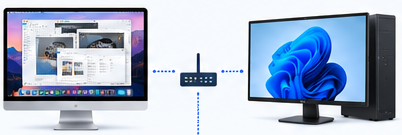
DISPLAY & INPUT
Your Mac
Displays your Windows apps in independent macOS windows.
ETHERNET / WI-FI
Your local network
Connect both computers over Ethernet or Wi-Fi.
APPLICATIONS & PROCESSING
Your Windows PC
Runs the applications and provides the processing power.
Connect
Connect Duplexity Client on your Mac to Duplexity Host on your Windows PC, on the same local network.
Launch
Launch your Windows applications. They run on your Windows PC, using its hardware.
Use
Work in their independent windows on your Mac. Keyboard and mouse input is sent back to your PC.
A Windows PC is required. Duplexity does not run Windows in a virtual machine on your Mac and does not provide a cloud PC.
Get started with Duplexity